 Ask ten people what a meal planning app should do and you’ll get ten different answers. Some want the whole week generated for them. Some just want their own recipes off sticky notes and into something searchable. Some want a shared list their whole household can edit without a group text. A few aren’t really looking for meal planning at all; they want to understand why they eat the way they do, and food logging is just the mechanism.
That range is exactly why this list doesn’t force all nine apps into the same box. An app built for macro precision and an app built for a family’s Tuesday-night chicken rotation aren’t competing for the same job, so they don’t get evaluated the same way here. What follows is nine apps genuinely worth trying in 2026, presented as the apps themselves are: differently.
Quick pick: nine apps, nine different jobs
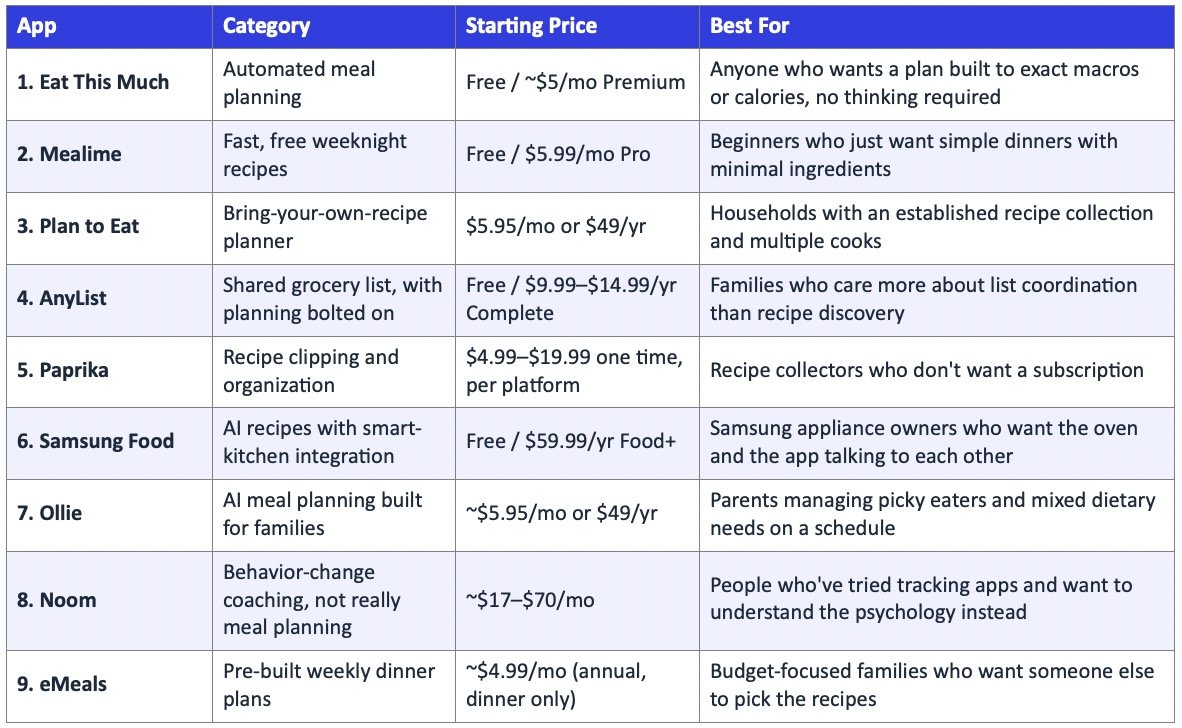
9 Diet and Best Meal Planning Apps 2026
1. Eat This Much: the plan that skips the deciding

Six million people currently have an Eat This Much account, and the app has generated somewhere north of 310 million individual meals for them. Those numbers exist because the app answers a narrower question than most of the others on this list: not “what’s a good recipe” but “what set of meals adds up to exactly what I need today.” Set a calorie and macro target, or pick a diet type and let the app set targets automatically, and it assembles a full week from a curated recipe database rather than open user submissions.
Different macros can be set for different days, useful for carb cycling or a scheduled refeed, which is a detail most general meal planners don’t bother with. The free tier covers a single day’s plan; Premium, roughly five to six dollars a month on annual billing, unlocks the full week plus a grocery list that updates itself the moment a meal changes and can be sent straight to Instacart, Walmart or Amazon Fresh.
Worth knowing going in: because meals are generated to fit the macro target rather than pulled from a fixed seasonal menu, a very tight or unusual split narrows the recipe pool, and the free tier’s single day can start to feel repetitive before Premium’s larger rotation kicks in.
2. Mealime: fast, free, and starting to show its age

- 5 million downloads, 4.8 stars across more than 50,000 App Store reviews
- Recipes capped at roughly 30 minutes, built from short, common ingredient lists
- Free tier is genuinely usable, not a demo with a paywall two taps in
Mealime’s entire pitch is removing friction from a weeknight decision that shouldn’t take fifteen minutes to make. Pick a diet type, note any allergies, and the app hands over a short weekly rotation with an auto-populated, aisle-sorted grocery list. Pro, now $5.99 a month after a couple of price bumps, adds nutrition and macro detail, recipe notes, and access to the previous week’s plan.
The catch is what’s happened since Albertsons acquired Mealime in 2022. Updates have mostly meant new recipes and bug fixes rather than new capability, servings are capped at four (in increments of two, so a family of five is out of luck), and there’s still no pantry or fridge awareness at all. For a fast, free, no-frills weeknight fix it still works. For anything more, it hasn’t moved much in a few years.
3. Plan to Eat: for people who already know what they like to cook
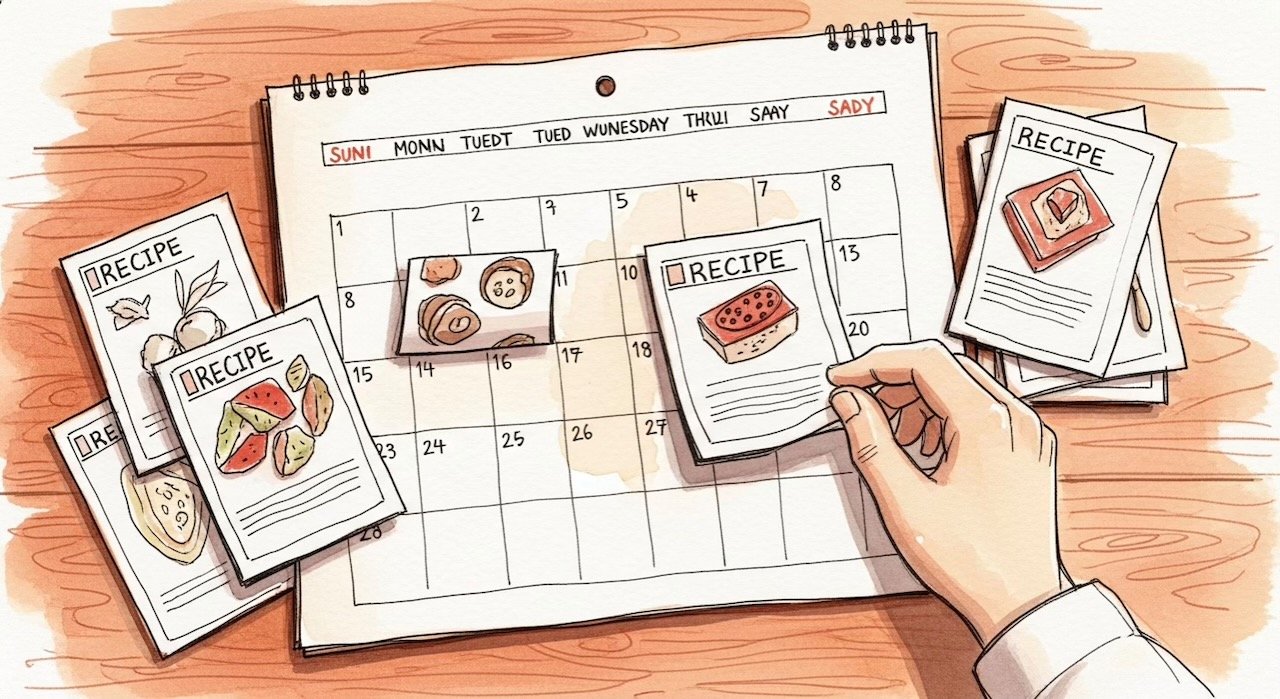
Plan to Eat doesn’t suggest a single recipe. That’s deliberate. Instead of an algorithm guessing what a household might enjoy, it gives every user a blank recipe book, a browser clipper to pull recipes in from almost any site, and a drag-and-drop calendar to build a week from what’s already saved. A grocery list generates automatically from whatever lands on the calendar, combining ingredients across recipes so nobody buys three separate jars of cumin.
People who’ve used it for a decade describe it as the one subscription they’ve never once considered cancelling, which says something in a category full of apps people quietly stop opening after a month. The sharing setup is basic but effective: one household login syncs recipes, plans and lists across every phone in the family, so whoever’s at the store sees the same list as whoever built the plan on Sunday night.
There is no free tier once the 14-day trial ends, at $5.95 a month or $49 a year, and there’s genuinely no recipe suggestion feature of any kind, a point real users raise often enough that it’s become the single most requested feature. If a household doesn’t already have a recipe collection worth organizing, this is the wrong starting point; the app has nothing to suggest until they bring their own ideas to it.
4. AnyList

What if the actual bottleneck in a household’s food logistics isn’t the recipes, it’s that three people are texting each other “did you get milk” at the same time? AnyList starts from that premise. It’s a shared grocery list app first, built for real-time syncing across everyone in a household, with a meal planning calendar and light recipe storage layered on top rather than the other way around.
Where it fits: families and shared households where coordinating who’s buying what matters more than discovering new dinners, plus anyone already using Siri or Alexa, since AnyList integrates with both for hands-free list additions.
AnyList Complete runs $9.99 a year for an individual or $14.99 for a household, on top of a free tier that already covers list sharing and basic recipe import. That’s inexpensive next to almost everything else on this list. The tradeoff is that the meal planning half of the app is thin: a calendar to drop recipes onto, without the automated suggestions or nutrition detail that a purpose-built planner offers. AnyList wins the list. It doesn’t really try to win the plan.
5. Paprika

Paprika does one thing and has done it well for long enough that most “best meal planning app” lists still put it near the top out of habit, even though it barely plans meals at all. It’s a recipe manager: clip anything from the web with a bookmarklet, scale servings, and file it away in a fast, searchable library. That part is genuinely excellent.
- No auto-generated meal suggestions of any kind
- The meal planner is a blank calendar you drag recipes onto by hand
- Adding a recipe to the calendar doesn’t add its ingredients to the grocery list; the two features don’t talk to each other
- One-time purchase, but per platform: about $5 on mobile, $20 on desktop, so a household on phone and laptop pays $25 to $35 total
For someone who already knows how to cook and just wants their recipe box out of a shoebox, it’s hard to beat. For someone hoping the app will help decide what to make, it hands over a blank page instead.
6. Samsung Food: recipes in, appliances out

Samsung Food is what happened after Samsung bought Whisk, a smart food platform, in 2019 and rebuilt it around its appliance ecosystem. The result is a free recipe discovery and meal planning app with one feature nothing else on this list can touch: if the kitchen has a Samsung oven or cooktop with SmartThings connectivity, Samsung Food can send cook settings directly to the appliance, and Family Hub fridge owners can order groceries through Instacart from the fridge screen itself.

That table is really the whole review. The smart-home party trick is unique and genuinely useful for the right household. But calling it a meal planner slightly oversells the planning: every recipe still gets assigned to the calendar by hand, and even the paid tier doesn’t auto-generate a week the way a dedicated planning app does.
7. Ollie: the AI planner built for people with kids, not gym goals

Ollie is the newest name on this list, and the best-funded: backed by Khosla Ventures and the Allen Institute for AI, with a 4.8-star iOS rating from a small but enthusiastic base of just under 900 reviews. It launched in 2025 specifically for the household where dinner is a daily negotiation between a picky six-year-old, a gluten-free parent, and whoever has time to cook that night.
Tell it household size, dietary needs, and how much time a given night has, and it generates a full week with kid-friendly filters that hold up (a common complaint about other family apps is that “kid-friendly” mode still suggests things no five-year-old will touch), allergen rules applied automatically across every suggestion, and a pantry feature where a photo of the fridge produces meal ideas built from what’s already there. One reviewer put it about as plainly as it gets: an app finally took the daily “what’s for dinner” fight off the table entirely.
At roughly $5.95 a month or $49 a year after the trial, it’s priced like the family planners rather than the premium coaching apps. The Android build lags the iOS one in polish and ratings, and being newer means less of a track record than Plan to Eat’s decade or Mealime’s five million downloads. For a family specifically wrestling with mixed dietary needs on a schedule, though, it’s the most purpose-built option here.
8. Noom: not really a meal planner, and that might be the point

Noom doesn’t belong on a meal planning list in the strictest sense. It doesn’t suggest recipes, build a calendar, or generate a grocery list. It’s a behavior-change program built around daily psychology lessons, color-coded food logging (foods sorted loosely by calorie density rather than banned outright), and either human or AI coaching. It’s on this list because for a specific kind of person, one who has already tried three tracking apps and quit each one within a month, the problem was never the app. It was not understanding why the eating pattern kept repeating.
Where it actually delivers
The CBT-based curriculum is genuinely educational, not filler between ads, and independent reporting puts average weight loss around 12 pounds over 16 weeks. One tester who stuck with the program for nine months kept the majority of the weight off a full year after cancelling, which is the kind of outcome color-coded logging alone doesn’t usually produce.
Where it falls short
The price is the headline problem: $17 to $70 a month depending on plan and commitment length, well above anything else on this list, for a program with no meal planning functionality whatsoever. The Better Business Bureau has logged over 1,200 complaints specifically about difficulty cancelling the auto-renewing subscription. If the goal is a plan for tonight’s dinner, this is the wrong app entirely. If the goal is understanding why every diet app gets abandoned by week three, it’s worth the look.
9. eMeals: the budget dinner plan that still works

eMeals has been publishing weekly dinner plans since before meal kits existed, and the model hasn’t changed much because it doesn’t need to: seven new recipes a week across fifteen-plus diet styles, from keto and Mediterranean to 30-minute and budget-friendly, with a shopping list that pushes straight to Walmart, Instacart or Shipt.
- Included: weekly dinner plans, flexible recipe swapping across all fifteen diet categories, grocery delivery sync
- Not included on the base plan: breakfast and lunch, which cost extra as add-ons
- Not included at all: ingredient filtering for allergies, so avoiding a specific allergen means manually checking and swiping out ingredients one at a time
At $4.99 a month on the annual plan, it’s one of the cheapest options in this entire roundup, cheaper than Eat This Much Premium or Mealime Pro. The tradeoff for that price is that recipe selection is still manual each week (nothing auto-populates a plan the way Eat This Much or Ollie do), and the app is mobile only, with no desktop option for the household member who’d rather plan from a laptop. For a family whose main goal is a cheap, reliable answer to “what’s for dinner” without much technology behind it, it still holds up in 2026.
Methodology
The nine apps here were pulled from current App Store and Google Play rankings, ongoing recommendations across meal-planning and parenting communities, and hands-on testing and documentation review, then deliberately kept varied rather than narrowed to a single category. Two names that show up often in older “best of” roundups are missing on purpose: Yummly, which Whirlpool permanently shut down in December 2024, and any app whose current status couldn’t be verified directly against a live pricing page or app store listing at the time of writing. Where sources disagreed on whether a service was still operating, the live product page was treated as the deciding source, not a third-party blog post.
Frequently asked questions
What’s the actual difference between a meal planning app and a recipe app?
A recipe app, like Paprika, helps store and organize recipes someone already has or finds. A meal planning app decides, generates, or at least schedules what gets cooked across a week. Several apps here, Samsung Food and AnyList especially, blur the line: strong on recipes or lists, thin on actual planning.
Is Noom really a meal planning app?
Not by any strict definition. It’s included because the brief here is diet and meal planning broadly, and Noom solves the upstream problem, understanding eating behavior, that sends a lot of people bouncing between tracking apps in the first place.
Which app on this list is best for a big family?
Ollie and Plan to Eat both handle multiple dietary needs and shared access well. Mealime specifically caps servings at four, which rules it out for a household of five or more without workarounds.
Do any of these apps work without a subscription at all?
Paprika is the one true exception: a one-time purchase per platform, no recurring cost ever. AnyList and Samsung Food both have usable free tiers, though the meal-planning-specific features on both sit behind a paid upgrade.
Is Yummly still around?
No. Whirlpool laid off the entire Yummly team in April 2024 and shut the app and website down completely by December 20, 2024. Any current list that still recommends it hasn’t been updated recently.